Description
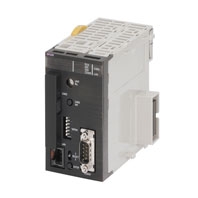
The SPU Unit reads PLC I/O memory according to specified collection methods and stores the data in CSV (Comma Separated Value) files with time stamps. The SPU Unit can record a variety of data from equipment using a PLC.
Data Collection Using a PLC Unit
PLC data is collected in a PLC Unit with superior environmental resistance without using a computer.
Until now, data has been collected in PLC memory.
Using an SPU Unit, however, eliminates the need for a PLC with a large-capacity memory and also eliminates the need for programming data collection in the ladder program.
Fast Collection of Large Amounts of Data with Data Concurrency
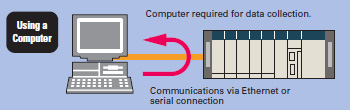
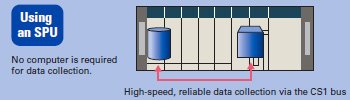
Using a computer for data collection presents the problems of a slow collection speed and low collection point capacity. An SPU Unit enables high-speed collection of large amounts of data*.
Direct use of the PLC bus instead of communications via a serial connection or LAN enables large amounts of data to be collected at a high speed.
Some data collection devices from other companies may not provide data concurrency. The SPU Unit, however, provides concurrency of simultaneous data.
* The maximum total size of all variables is 7,776 words. For details, refer to “CS1W-SPU01/SPU02-V2, CJ1W-SPU01-V2 SPU Units Operation Manual”(Cat. No. V236).
Use the SPU Unit to record data such as production history data, inspection data, and process data. Electronically managing data on the operation of equipment and devices enables root cause analysis when errors occur, as well as a proper understanding of operational tendencies.
No Ladder Programing
No ladder programming is required for data collection. Data can be collected simply by performing the settings from the setting software (i.e., SPU-Console).
No need to leave extra space in the PLC memory for saving data.
Note: The PLC cycle time increases in proportion to the number of points collected.
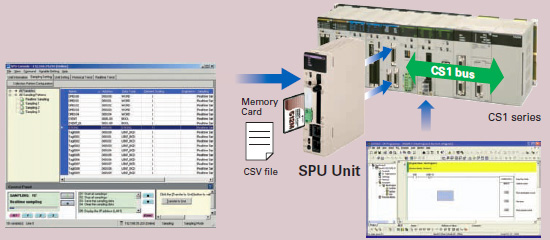
Restriction-free Data Configuration Files without Depending on PLC Memory Space
Files can be created with the desired data configuration for only the necessary data from PLC memory.
The data to be collected can be stored in files in the required data type, such as BOOL, REAL, INT, BCD, or STRING.
Data configuration files required for the host computer can be created, so necessary data can be retrieved even if the SPU is mounted in a device after the PLC is already set up.
CHANNEL_BLOCK has been added to the variable data types from SPU Unit version 2.0. When the data type is set to CHANNEL_BLOCK, the data in a consecutive memory area starting from the specified address for the specified number of elements is handled as a single data item with no commas.
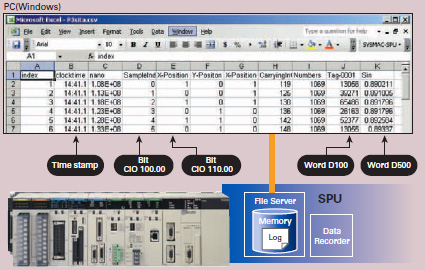
Windows is a registered trademark of Microsoft Corporation in the United States and other countries.
Microsoft product screen shots reprinted with permission from Microsoft Corporation.
Other company names and product names in this document are the trademarks or registered trademarks of their respective companies.
Data Management Middleware for the SYSMC SPU
The Data Management Middleware for the SPU Unit is Windows-based software for transferring data files collected by the SPU Unit to the computer and managing the files.
The CSV files can be transferred to a computer by setting only the CSV files the user wants to transfer. It is not necessary to install or set up FTP server software on the computer.
The data collected by the SPU Unit is automatically stored in an untitled table as a database. It isn’t necessary to create a program to store data to the database, reducing the cost of system development. (This is a new version-2 function.)
The user can select a name and folder when copying the data files to the computer. Files can be copied with easily distinguished names, for example, by adding the collection date and time to a chosen character string such as “Device1.”
The SPU Unit will continue recording data even if the computer is turned OFF because of a network interruption or other cause.
Copying can be resumed from a data file if it is not already transferred. Data collection systems can therefore be established with strong resistance against system disturbances.
The SPU Unit time and CPU Unit time can be periodically set to the computer time automatically.

International Standards
- The standards are abbreviated as follows: U: UL, U1: UL (Class I Division 2 Products for Hazardous Locations), C: CSA, UC: cULus, UC1: cULus (Class I Division 2 Products for Hazardous Locations), CU: cUL, N: NK, L: Lloyd, and CE: EC Directives.
- Contact your OMRON representative for further details and applicable conditions for these standards.
SPU Unit (High-speed Data Storage Unit)
| Unit type |
Product name |
Specifications | No. of unit numbers allocated |
Current consump- tion (A) |
Model | Stand- ards |
||
|---|---|---|---|---|---|---|---|---|
| PC Card slot | Ethernet (LAN) port |
5 V | 24 V | |||||
| CJ1 CPU Bus Units |
SPU Unit (High-speed Data Stor- age Unit)  |
CF Card Type I/II × 1 slot Use an OMRON HMCEF[][][] Memory Card. |
1 port (10/100Base- TX) |
1 | 0.56 | – | CJ1W-SPU01-V2 | UC1, CE |
2. This unit cannot be used with the Machine Automation Controller NJ-series.
Support Software
| Product name | Specifications | Model | Standards |
|---|---|---|---|
| SPU-Console Support Software |
Functions: Unit settings, sampling settings, etc., for High-speed Data Collection Units (required for making settings for this Unit) OS: Windows 7/Windows 8/Windows 8.1/Windows 10 |
WS02-SPTC1-V2 | – |
Option
| Product name | Specifications | Model | Stand- ards |
|
|---|---|---|---|---|
| SPU Unit Data Management Middleware |
Function: Data files collected by SPU Unit Data Management Middleware are automatically acquired at the personal computer, and can be registered in a database. OS: Windows XP/Windows Vista/Windows 7/ Windows 8 |
1 license | WS02-EDMC1-V2 | – |
| 5 licenses | WS02-EDMC1-V2L05 | |||
| Memory Cards | Flash memory, 128 MB | Note: Memory Card is required for data collection. |
HMC-EF183 | N, L, CE |
| Flash memory, 256 MB | HMC-EF283 | |||
| Flash memory, 512 MB | HMC-EF583 | |||
Industrial Switching Hubs
| Product name |
Appear- ance |
Specifications | Current con- sumption (A) |
Model | Stand- ards |
||
|---|---|---|---|---|---|---|---|
| Functions | No. of pors |
Failure detection |
|||||
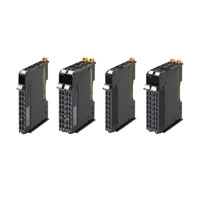
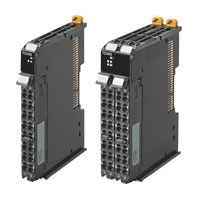
| Industrial Switching Hubs |
 |
Quality of Service (QoS): EtherNet/IP control data priority Failure detection: Broadcast storm and LSI error detection 10/100BASE-TX, Auto-Negotiation |
3 | No | 0.22 | W4S1-03B | UC, CE |
 |
5 | No | 0.22 | W4S1-05B | |||
| 5 | Yes | 0.22 | W4S1-05C | CE | |||
Functional and Performance Specifications
| Item | Specifications | |
|---|---|---|
| Unit model number | CJ1W-SPU01-V2 | |
| Applicable CPU Units | CJ Series | |
| Unit classification | CPU Bus Unit | |
| Unit number | 0 to F | |
| Mounting location | CPU Backplane or CJ-series Expansion Backplane | |
| No. of Units per PLC | 16 Unit max. | |
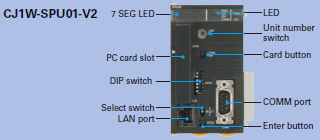
| Interfaces | PC card slot | Memory Card slot Used by mounting a Memory Card. * |
| COMM port | Connects to an uninterruptive power supply (UPS) for detection of power failure. | |
| Ethernet (LAN) ports | One port (10/100Base-TX, RJ45 Modular Connector) | |
| UPS power failure input | None (UPS connected to COMM port.) | |
| Settings and operation |
Unit number switch (UNIT) | Rotary switch: Sets the unit number of the Unit as a CPU Bus Unit. |
| Select switch (SELECT) | Toggle switch: Sets the number of the command to execute. | |
| Enter button (ENTER) | Pushbutton switch: Confirms and starts execution of the command number set using the select switch. |
|
| DIP switch (DIPSW) | DIP switch: System settings | |
| Card button | Pressed to release the Memory Card inserted in the Memory Card slot. The Memory Card can then be removed. |
|
| Indications | LED indicators | RUN, ERC, ERH, COMM, LAN1, LAN2, and CARD |
| 7-segment display | Displays error information and operating status of the SPU Unit. Displays the command number set on the select switch. Displays the IP address. Display other information. |
|
| Functions | Sampling Saving files Network communications Recipe function |
|
| Operating modes | Data Storage Mode and Sampling Mode (Either mode can be selected with the Change Operating Mode command.) |
|
| Current consumption | 5 VDC, 560 mA max. (SPU Unit only) Other: Memory Card (HMC-EF[][][]): 120 mA max. (Supplied from Power Supply Unit.) |
|
| Dimensions | 51 × 90 × 65 mm (W × H × D) | |
| Weight | 180 g max. | |
* Use the HMC-EF[][][] Memory Card from OMRON. Normal operation may not be possible with any other compact flash cards.
General Specifications: Specifications conform to the general specifications of the CJ-series CPU Units.
Detailed Specifications
| Item | Specifications | |||
|---|---|---|---|---|
| Sampling | Sampling Mode |
Sampling patterns | Realtime sampling: 1 pattern Normal sampling: Up to 3 patterns |
|
| Starting methods | Any one of the following methods can be used: Start automatically when SPU Unit is started. Start with an SPU-Console operation. Start with the SPU Unit’s front-panel command buttons. (Specify the command number.) Start from the CPU Unit’s ladder program. |
|||
| Interval | User-specified intervals: *1 Realtime sampling: 5 ms min. Normal sampling: 100 ms min. |
|||
| Data Storage Mode (Unit Ver. 1.2 or later) |
Data Collection Patterns |
Basic Collection Pattern: 1 pattern (required) Data Collection Patterns: Up to 64 patterns |
||
| Starting methods | Basic Collection Pattern (required) |
Any one of the following methods can be used: Start when a specified event occurs. (Use a memory event or scheduled event. For details, see the description of Data Collection Patterns 1 to 64 below.) Start automatically when SPU Unit is started. Start with an SPU-Console operation. Start with the SPU Unit’s front-panel command buttons. (Specify the command number.) Start from the CPU Unit’s ladder program. |
||
| Data Collection Patterns 1 to 64 |
Either of the following methods can be used to start when an event occurs: Memory events: Start when a CPU Unit bit or word value matches a specified condition. Up to 500 memory events can be specified. Scheduled events: Start at a specified time or time interval. Up to 16 scheduled events can be specified. |
|||
| Interval | User-specified intervals: *2 *3 Basic Collection Pattern: 5 ms min. Data Collection Patterns: 100 ms min. |
|||
| Data Storage Mode (Unit Ver.2.0 or later) |
Copy option | Basic Collection Pattern: Cannot be set. Data Collection Patterns: Up to 10 patterns. |
||
| Shared Sampling Mode and Data Storage Mode settings |
Applicable CPU Unit I/O memory areas |
CIO Area, WR Area, HR Area, AR Area, DM Area, and EM Area banks 0 to C (CJ2: 0 to 18) |
||
| Specifying I/O memory areas |
Specify the desired CPU Unit I/O memory area (data area) with a variable. The data type can be specified with the variable. The variables can be managed in groups. |
|||
| Variable data types |
BOOL, INT, UINT, DINT, UDINT, REAL, LREAL, STRING, CHANNEL, UINT BCD, UDINT BCD, WORD, DWORD, CHANNEL BLOCK |
|||
| Maximum number of variables |
7,776 words total for all variables | |||
| Record Condition setting |
Set whether or not to use a record condition. If a record condition is used, sampling data is stored within the SPU Unit only when the record condition is met. For example, sampling data can be recorded only while a specified bit is ON or a specified word contains a particular value (comparison). |
|||
| Data exchange with the CPU Unit |
CPU Bus Unit Area CPU Unit to SPU Unit: Command execution (such as starting/stopping sampling, clearing a sampling file, or saving a sampling file). SPU Unit to CPU Unit: SPU Unit status information |
|||
| Saving files | Collected data file format |
CSV files | Indices (record number), time stamps (hh:mm:ss:ms), ns, sampling indices (serial numbers starting at 0 when sampling is started), data for each symbol delimited with comma, records delimited with carriage returns |
|
| Record contents |
||||
| Number of sampling result records stored in one file |
Any one of the following methods can be used. The number of records can be specified. A time period can be specified. (The number of records is calculated automatically from the time period and interval between samples.) With a version 1.2 or later SPU Unit, the number of records can be left unspecified. (In this case, data is added to the file until data collection is stopped. Records are added to one file from the start of data collection until the end.) |
|||
| Scaling | Instead of directly storing the values collected from the CPU Unit’s I/O memory, the collected values can be scaled with a linear equation or upper/lower limit range before storage (unit version 1.2 or later). |
|||
| File size | 2 GB per file | |||
| Record size | Specified by user. | |||
| Number of records | Specified by user or calculated automatically. | |||
| Saving method | Data can be saved to a single file or multiple files (up to 1,200 files). | |||
| Network communications | Windows network shared folders |
Files in the Memory Card inserted in the PC card slot in the SPU Unit can be shared with a Windows personal computer. |
||
| FTP | FTP client provided. | |||
| FINS communications |
FINS server to execute FINS command Routing to transfer FINS messages |
|||
| Recipe function |
Data Storage Mode (Unit Ver. 2.0 or later) |
Number of fields | 10,000 | |
| Recipe files | File format: CSV The file size is restricted by the size of file that can be stored in the recipe folder. Records: Specified by the user. |
|||
| Number of records | No limit, but restricted by the file size that can be stored in the recipe folder. | |||
| Writing method | Conversion method: Each field is written to the specified address in the specified data type. Continuous region method: Data written to continuos memory addresses. |
|||
| Searching for recipe keys |
Searching within files: The text string that was passed as the key is searched for in the target search columns in the recipe files and the rows for any matches that are found are extracted as recipe data. Searching for file names: The text string that was passed as the key is searched for in the recipe file names (i.e., a search is made for key.csv), and the files with matching files names are used as recipe files just like previous versions. Key list search: A search is made for recipe keys with the method used for unit version 2.0. |
|||
will always be longer than the CPU Unit’s cycle time even if the sampling interval is set shorter than the cycle time.
*2. The Data Collection Patterns use the data collected by the Basic Collection Pattern, so the data will be collected at the
Basic Collection Pattern’s interval even if the Data Collection Pattern’s interval is set shorter than the Basic Collection
Pattern’s interval.
*3. The actual Basic Collection Pattern interval will always be longer than the CPU Unit’s cycle time even if the sampling
interval is set shorter than the cycle time.
Note: For details, refer to “CS1W-SPU01/SPU02-V2, CJ1W-SPU01-V2 SPU Units Operation Manual”(Cat. No. V236).
SPU-Console (Setting/Monitoring Software) Specifications
The SPU-Console is a software product used for OMRON’s Storage and Processing Unit (called the SPU Unit) to set and operate the SPU Unit, monitor operating status/errors, display trend graphs, and perform other operations from a personal computer.
SPU-Console Specifications
| Item | Specifications | |
|---|---|---|
| Model number | WS02-SPTC1-V2 (SPU-Console Ver. 2.2) | |
| System requirements | Computer hardware | Computer that meets the system requirements for Microsoft Windows |
| CD-ROM drive | Required for installation. | |
| Display | Super VGA (800 × 600) or better high-resolution video adapter and monitor | |
| Mouse | Must conform to the models supported by the applicable OS. | |
| Network card | A separate Ethernet network card is required for computers that do not have a LAN port. | |
| OS | Microsoft Windows 7 (32bit/64bit) Microsoft Windows 8 (32bit/64bit) Microsoft Windows 8.1 (32bit/64bit) * Microsoft Windows 10 (32bit/64bit) * |
|
| Application platform | Microsoft.NET Framework Version 4.6 | |
| Communications platform | FinsGateway Version 2003 | |
| Functions | Unit information, Unit setup, variable settings, collection pattern settings, event settings, recipe settings, trend graphs, and reports |
|
| Unit information | Monitor | SPU Unit operating status and error information are displayed. |
| Operation | Operations, such as starting sampling | |
| Unit setup | IP network settings | |
| FINS network settings | ||
| Variable settings | Setting items to sample (by specifying I/O memory addresses using variables) | |
| Collection pattern settings | Collection pattern settings (period, file designations for saving, etc.) | |
| Recipe settings (Data Storage Mode) | Recipe settings (recipe file, write destination, key, etc.) | |
| Event settings (in Data Storage Mode) |
Memory event settings | Settings for conditions according to changes in memory (e.g., bits turning ON) |
| Scheduler settings | Settings for schedules (e.g., specific times, time intervals) | |
| Trend graphs | Historical trends | CSV files are read and displayed. |
| Realtime trends (Sampling Mode) |
Current sampling data is read and displayed in trend graphics in real time. | |
* Use SPU-Console Ver. 2.21 or later for Windows 8.1 and Windows 10.
Software Package Contents
The WS02-SPTC1-V2 contains the following software and data.
SPU-Console Execution Program
The program that performs SPU Unit settings and operations.
SPU Unit System Data
This system data is transferred to the SPU Unit.
FinsGateway Version 2003
This communications middleware is required to run the SPU-Console.
Manual Data
The manual data includes the SPU Unit Operation Manual (Cat. No. V236), the SPU-Console Operation Manual (Cat. No. V230), the SPU-Console Version 1.3 Operation Manual (Cat. No. V231), and the SPU-Console Version 2.2 Operation Manual (Cat. No. V237) in PDF (portable document format).
(Unit: mm)
CJ1W-SPU01-V2

|
Catalog Name
|
Catalog Number
[size] |
Last Update
|
|---|---|---|
 CJ1W-SPU01-V2 Data Sheet CJ1W-SPU01-V2 Data Sheet |
– [821KB] |
Apr 02, 2018 |
| SPU Unit Catalog |
V301-E1-07 [3504KB] |
Apr 02, 2018 |
| HMC-EF183 Data Sheet |
– [232KB] |
Jun 06, 2012 |


Reviews
There are no reviews yet.