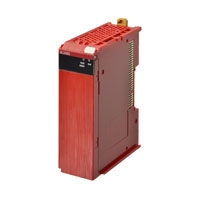
Description
• EN ISO13849-1 (PLe/Safety Category4), IEC 61508 (SIL3) certified.
• One connection using Safety over EtherCAT (FSoE) * protocol enables flexible configuration by mixing the Safety Units with standard NX I/O.
• The Safety CPU Unit controls up to 128 Safety I/O Units.
• Hardware and safety circuits can be configured using the Sysmac Studio (Ver. 1.07)
• Compliant with IEC61131-3
• Safety programs can be standardized and reused efficiently by using POUs for design and operation.
EtherCAT”) defines a safety related communication layer for EtherCAT. Safety over EtherCAT meets the requirements
of IEC 61508 SIL 3 and enables the transfer of safe and standard information on the same communication system
without limitations with regard to transfer speed and cycle time.
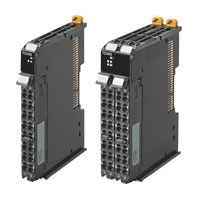
Safety CPU Unit
| Unit type | Appearance | Specification | Unit version |
Model | |||
|---|---|---|---|---|---|---|---|
| Maximum number of safety I/O points |
Program capacity |
Number of safety I/O connections |
I/O refreshing method |
||||
| Safety CPU Unit (NX-SL3[]00) |
 |
256 points | 512 KB | 32 | Free-Run refreshing |
Ver. 1.1 | NX-SL3300 |
 |
1024 points | 2048 KB | 128 | Free-Run refreshing |
Ver. 1.1 | NX-SL3500 | |
Note: Refer to the NX-CSG/SL5/SI/SO Datasheet for details of the NX-SL5[][][] Safety CPU Unit.
Configuration Devices
NX-series Communications Coupler Units
| Product name |
Appearance | Supported communications protocol |
NX Unit power consumption |
Maximum I/O power supply current |
Model |
|---|---|---|---|---|---|
| EtherCAT Coupler Unit *1 |
 |
Communications cycle in DC Mode *2 250 to 4,000 μs |
1.45 W or lower | 4 A | NX-EEC201 |
| Communications cycle in DC Mode *2 125 to 10,000 μs |
1.25 W or lower | 10 A | NX-EEC202 | ||
| NX-EEC203 | |||||
| EtherNet/IP Coupler Unit *1 |
 |
EtherNet/IP | 1.60 W or lower | 10 A | NX-EIC202 |
*1 One End Cover NX-END01 is provided with the NX-series Communications Coupler Units.
*2 This depends on the specifications of the EtherCAT master. For example, the values are as follows when the EtherCAT
Coupler Unit is connected to the built-in EtherCAT port on an NJ5-series CPU Unit: 500 μs, 1,000 μs, 2,000 μs, and
4,000 μs. Refer to the NJ/NX-series CPU Unit Built-in EtherCAT Port User’s Manual (Cat. No. W505) for the specifications
of the built-in EtherCAT ports on NJ/NX-series CPU Units.
This also depends on the unit configuration.
Automation Software Sysmac Studio
Please purchase a DVD and required number of licenses the first time you purchase the Sysmac Studio. DVDs and licenses are available individually. Each model of licenses does not include any DVD.
| Product name | Specifications | Model | ||
|---|---|---|---|---|
| Number of licenses |
Media | |||
| Sysmac Studio NX-I/O Edition Ver.1.[][] *1 |
Sysmac Studio NX-I/O Edition is a limited license that provides selected functions required for EtherNet/IP Coupler settings. * Because this product is a license only, you need the Sysmac Studio Standard Edition DVD media to install it. |
1 license | — | SYSMAC-NE001L |
| Sysmac Studio Safety Edition Ver.1.[][] *2 |
Sysmac Studio Safety Edition is a license including necessary setting functions for the safety control system. * Because this product is a license only, you need the Sysmac Studio Standard Edition DVD media to install it. |
1 license | — | SYSMAC-FE001L |
| Sysmac Studio Standard Edition Ver.1.[][] *3*4 |
The Sysmac Studio is the software that provides an integrated environment for setting, programming, debugging and maintenance of machine automation controllers including the NJ/NX-series CPU Units, NY-series Industrial PC,EtherCAT Slave, and the HMI. |
1 license *5 | — | SYSMAC-SE201L |
| Sysmac Studio runs on the following OS. Windows 7 (32-bit/64-bit version)/8(32-bit/64-bit version)/8.1 (32-bit/64-bit version)/10 (32-bit/64- bit version) * Refer to your OMRON website for details such as supported models and functions. |
(Media only) | DVD | SYSMAC-SE200D | |
*2 Safety Edition can be used with Communication Control Unit and EtherNet/IP Coupler Unit.
*3 The Sysmac Studio Standard Edition with license(s) (SYSMAC-SE[][][]L) provides functions of the NX-I/O Edition
(SYSMAC-NE001L).
*4 With the Sysmac Studio Standard Edition with license(s) (SYSMAC-SE[][][]L) version 1.10 or higher, you can use the
setup functions for the EtherNet/IP Coupler.
*5 Multi licenses are available for the Sysmac Studio (3, 10, 30, or 50 licenses).
Regulations and Standards
NX-series Safety Control Units NX-SL3/SI/SO
| Certification body | Standards |
|---|---|
| TÜV Rheinland * | • EN ISO 13849-1 • EN ISO 13849-2 • IEC 61508 parts 1-7 • IEC/EN 62061 • IEC/EN 61131-2 • IEC 61326-3-1 |
| UL | • NRAG (UL 508 and ANSI/ISA 12.12.01) • NRAG7 (CSA C22.2 No. 142 and CSA C22.2 No. 213) |
* The FSoE was certified for applications in which OMRON FSoE devices are connected to each other.
• Requirements for SIL 3 (Safety Integrity Level 3) in IEC 61508, EN 62061, (Functional Safety of Electrical/Electronic/
Programmable Electronic Safety-related Systems)
• Requirements for PLe (Performance Level e) and for safety category 4 in EN ISO13849-1
The NX-series Safety Control Units are also registered for RCM, EAC, and KC compliance.
General Specifications
| Item | Specification | |
|---|---|---|
| Enclosure | Mounted in a panel (open) | |
| Grounding method | Ground to 100 Ω or less. | |
| Operating environment |
Ambient operating temperature |
0 to 55°C (The upper limit of the ambient operating temperature is restricted by the installation orientation.) |
| Ambient operating humidity |
10% to 95% (with no condensation or icing) | |
| Atmosphere | Must be free from corrosive gases. | |
| Ambient storage temperature |
-25 to 70°C (with no condensation or icing) | |
| Altitude | 2,000 m max. | |
| Pollution degree | 2 or less: Conforms to JIS B3502 and IEC 61131-2. | |
| Noise immunity | Conforms to IEC 61131-2. 2 kV on power supply line (Conforms to IEC 61000-4-4.) |
|
| Insulation class | Class III (SELV) | |
| Overvoltage category | Category II: Conforms to JIS B3502 and IEC 61131-2. | |
| EMC immunity level | Zone B | |
| Vibration resistance | Conforms to IEC 60068-2-6. 5 to 8.4 Hz with 3.5-mm amplitude, 8.4 to 150 Hz, acceleration of 9.8 m/s2, 100 minutes each in X, Y, and Z directions (10 sweeps of 10 min each = 100 min total) |
|
| Shock resistance | Conforms to IEC 60068-2-27. 147 m/s2, 3 times each in X, Y, and Z directions |
|
| Insulation resistance | 20 MΩ between isolated circuits (at 100 VDC) | |
| Dielectric strength | 510 VAC for 1 min between isolated circuits, leakage current: 5 mA max. | |
| Installation method | DIN Track (IEC 60715 TH35-7.5/TH35-15) | |
Specifications of Individual Units
Safety CPU Unit NX-SL3300/SL3500
| Unit name | Safety CPU Unit | |
|---|---|---|
| Model | NX-SL3300 | NX-SL3500 |
| Maximum number of safety I/O points | 256 points | 1024 points |
| Program capacity | 512 KB | 2048 KB |
| Number of safety master connections | 32 | 128 |
| I/O refreshing method | Free-Run refreshing | Free-Run refreshing |
| External connection terminals | None | None |
| Indicators | [FS] LED, [VALID] LED, [DEBUG] LED, [TS] LED, [RUN] LED  |
[FS] LED, [VALID] LED, [DEBUG] LED, [TS] LED, [RUN] LED  |
| Dimensions | 30 × 100 × 71 mm (W × H × D) | |
| I/O power supply method | Not supplied. | |
| Current capacity of I/O power supply terminals |
No I/O power supply terminals | |
| NX Unit power consumption | 0.90 W max. | |
| Current consumption from I/O power supply |
No consumption | |
| Weight | 75 g max. | |
| Installation orientation and restrictions |
Installation orientation: 6 possible orientations Restrictions: None |
|
Function Specifications
| Item | Function | ||
|---|---|---|---|
| Setting Parameters |
Safety I/O Settings | You make a setting for safety process data communications and connection with safety I/O devices. |
|
| Safety Process Data Communications Settings |
You select Safety I/O Units to perform safety process data communications (FSoE communications) and make necessary settings. |
||
| Safety Device Allocation Settings |
You set the connection between Safety I/O Units and safety devices. |
||
| EtherNet/IP Safety Connection Settings *1 |
You can register target devices of EtherNet/IP Safety network and configure the connection settings. |
||
| Standard I/O Settings |
Exposed Variable Settings |
You set whether to expose global variables of the Safety CPU Unit. The values of exposed variables can be referenced from NJ/NX- series CPU Units and NY-series Industrial PCs. |
|
| Standard Process Data Communications *2 |
You set the devices and ports of the Standard I/O Units for the exposed variables of the Safety CPU Unit. |
||
| Safety Task Settings | You define the execution cycle and timing of the safety task and programs to be executed in the task. |
||
| Assigning Programs | You assign safety programs to execute to the task. | ||
| I/O Map Settings | The ports of Safety I/O Units used in safety process data communications are displayed. You assign device variables used in safety programs to the I/O ports. |
||
| Creating Safety Programs |
Instruction List (Toolbox) | A hierarchy of the functions and function blocks that you can use is displayed in the Toolbox. You can drag the required functions and function blocks onto the FBD editor to insert it to a safety program. |
|
| FBD Programming | You connect variables, functions, and function blocks with connecting lines to build networks. The FBD editor is used to enter them. |
||
| Adding FBD Networks | You create FBD networks on the FBD editor to create algorithms. | ||
| Inserting and Deleting Functions and Function blocks |
You insert and delete functions and function blocks on the FBD editor. |
||
| Entry Assistance | When you enter functions, function blocks, or parameters, each character that you enter from the keyboard narrows the list of candidates that is displayed for selection. |
||
| Commenting Out FBD Networks |
You can comment out each FBD network. When a network is commented out, it is no longer executed. |
||
| Converting Programs into Function Blocks *1 |
You can convert the safety program into user-defined function block. |
||
| Automatic Programming *1 | A safety programs can be automatically generated from input and output signals and expected values of the program. |
||
| Creating Variables | You create variables used in safety programs in the global or local variable table. |
||
| User-defined Function Blocks | You create user-defined function blocks. | ||
| Help Reference *3 | You can display the user-defined function block help with the popup menu or shortcut key. |
||
| Export/Import | POUs can be exported and imported. | ||
| Programs *4 | You can export/import POUs. | ||
| User-defined Function Blocks *3 |
You can export/import user-defined function blocks. | ||
| Searching and Replacing | You can search for and replace strings in the variable tables, programs, and function blocks of a Safety CPU Unit. |
||
| Debugging | Monitoring | Variables are monitored during safety program execution. You can monitor the present values of device variables assigned to Safety I/O Units and user-defined variables. The values can be monitored on the FBD editor or Watch Tab Page. |
|
| Changing the Present Values of Variables |
You can change the present values of user-defined variables and device variables as required. You can do this on the FBD editor or Watch Tab Page. |
||
| Forced Refreshing | The inputs from external devices and outputs to external devices are refreshed with a specified value on the Sysmac Studio. The specified value is retained even if the value of the variable is overwritten from the user program. You can use forced refreshing on the FBD editor or Watch Tab Page. |
||
| Offline Debugging *5 | You can check if the control program logic works as designed in advance using a special debugging function for the Simulator without connecting online with the Safety CPU Unit. |
||
| Initial Value Settings *6 |
You can set the initial values of variables when you start execution of simulation. |
||
| Feedback Settings *6 |
You can set input status that is linked to changes in output status when simulator is running. |
||
| Simple Automatic Test *7 |
You can check that expected values of the outputs to the inputs of the program are designed as intended using the Simulator functions of the Safety CPU Unit. |
||
| User Memory Usage Monitor *6 | The memory usage of the safety control system and usage of safety network such as I/O data size are displayed. |
||
| Debugging | Online Functional Test *1 | This function helps you to check the safety functional operation of the safety system. You can produce output device operation relative to the input and check whether the system operates as expected. It is possible to output the check results. |
|
| Safety | Safety Validation | You append the “safety-validated” information to a safety program when you can ensure safety of the program after you complete debugging. |
|
| Changing Operating Mode | There are four operating modes; PROGRAM mode, DEBUG mode (STOPPED), DEBUG mode (RUN), and RUN mode. The RUN mode can be selected only for the validated safety programs. |
||
| Mainte- nance |
Generating Safety Data Logging Settings File *1 |
Settings to use the safety data logging function can be generated as a file. |
|
| Generating Safety Unit Restore File *1 |
A file of safety program and settings to be transferred to the Safety CPU Unit using an SD memory card is generated for Safety Unit Restore function. |
||
| Security Measures |
Prevention of Incorrect Connections |
Setting the Node Name |
You set a unique name for each Safety CPU Unit to confirm that you operate the correct Safety CPU Unit. |
| Prevention of Incorrect Operation |
Safety Password | You can prevent unauthorized access to safety functions of Safety CPU Units by setting a safety password for online operations that affect the safety functions. |
|
| Prevention of Theft of Assets |
Data Protection (Programs) *4 |
You can set passwords for individual programs to prohibit displaying or changing them. |
|
| Data Protection (User-defined Function Blocks) *3 |
You can set passwords for individual user-defined function blocks to prohibit displaying or changing them. |
||
Note: Supported only by the Sysmac Studio version 1.07 or higher.
*1. Supported only by the Sysmac Studio version 1.24 or higher.
*2. Supported if the EtherNet/IP Coupler is selected with Sysmac Studio version 1.11 or higher.
*3. Supported only by the Sysmac Studio version 1.12 or higher.
*4. Supported only by the Sysmac Studio version 1.17 or higher.
*5. Supported only by the Sysmac Studio version 1.08 or higher.
*6. Supported only by the Sysmac Studio version 1.10 or higher.
*7. Supported only by the Sysmac Studio version 1.15 or higher.
Refer to the SYSMAC-SE[][][] Datasheet for function specifications of the Safety Control Unit.
Version Information
• Relationship between Unit Versions and Sysmac Studio Versions
EtherCAT Slave Terminal and EtherNet/IP Slave Terminal
Terminal to the built-in EtherCAT master of the CPU Unit via EtherCAT.
• This configuration is used to connect the Safety Control Units to the EtherNet/IP Coupler Units.
| NX Unit | Corresponding version *1 | |||||
|---|---|---|---|---|---|---|
| Model number | Unit version | EtherCAT Coupler Unit NX-ECC20[] |
NJ/NX-series CPU Units *2 |
Sysmac Studio |
ErherNet/IP Coupler Unit (NX-EIC202) |
Sysmac Studio |
| NX-SL3300 | 1.0 | 1.1 or later | 1.06 or later | 1.07 or later | — | — |
| 1.1 | 1.10 or later | 1.0 or later | 1.10 or later | |||
| NX-SL3500 | 1.0 | 1.2 or later | 1.07 or later | 1.08 or later | — | — |
| 1.1 | 1.10 or later | — | — | |||
If a Unit does not have the specified version, support is provided by the oldest available version after the specified
version.
Refer to the user’s manuals for the specific Units for the relation between models and versions.
*2 These Units cannot be mounted to Machine Automation Controllers with NX1P CPU Units. Mount and use an EtherCAT
Coupler Unit instead.
CPU Rack
• This configuration is used to connect the Safety Control Units to the CPU Units.
| Safety Control Unit model and version | NX bus master: CPU Unit | ||
|---|---|---|---|
| Model | Unit version | NX102 CPU Units | Sysmac Studio |
| NX-SL3300 | Ver. 1.0 | Ver. 1.30 | Ver. 1.22 |
| Ver. 1.1 | |||
| NX-SL3500 | Ver. 1.0 | ||
| Ver. 1.1 | |||
| NX-SL5500 | Ver. 1.3 | Ver. 1.31 | Ver. 1.24 |
| NX-SL5700 | Ver. 1.2 | — | — |
| Ver. 1.3 | Ver. 1.31 | Ver. 1.24 | |
(Unit: mm)
Safety CPU Unit NX-SL3300/SL3500

|
Catalog Name
|
Catalog Number
[size] |
Last Update
|
|---|---|---|
 NX-SL/SI/SO Data Sheet NX-SL/SI/SO Data Sheet |
– [2905KB] |
Nov 01, 2018 |
| NX-Series Safety Controller Stand-alone System brochure |
F100-E1-01 [1306KB] |
Feb 15, 2018 |
| NX-series Safety Controller (EtherCAT System) Catalog |
F101-E1-01 [1136KB] |
Feb 15, 2018 |

Reviews
There are no reviews yet.